¶ Clients
Our bot includes a mini-CRM. Anyone who has opened your bot at least once becomes a lead. Leads are shown on this screen along with their first and last order details. You can filter clients by cohorts and referral codes.
Clicking a client shows all their past orders, summary information, and the chat. Some clients' Telegram accounts and names may appear empty — this depends on the client's Telegram privacy settings.
¶ Client cohorts
Filter clients by the following cohorts:
- All clients — everyone who has opened your bot at least once
- Items in cart — clients with items in the cart and no completed order (abandoned carts)
- Active in the last week — clients with cart/order activity within the last week
- New in the last week — clients who opened your bot for the first time within the last week
- Inactive > week — clients with no cart/order activity for over a week
- Inactive > month — clients with no cart/order activity for over a month
¶ Chat
To chat with clients on behalf of your bot, we recommend using the Reply Bot feature, available for free to users of our Telegram restaurant and Telegram shop products. To enable it, create a group with your bot and activate the Reply Bot — see the guide for details.
You can also message a client from the Clients / Order history / Order screen and directly from the Orders screen.
If the client's @username is visible, you can message them from your personal Telegram account, but the client may not see messages from an unknown contact — that depends on their privacy settings. Messages sent via the Reply Bot or the admin panel chat, however, always reach the client.
¶ Mailings
Warm up your leads: send promo materials, special offers, photos and videos right from the admin panel.
On the Clients screen, click the Create mailing button. In the dialog, configure the recipients:
- Cohort — the client segment to target: All clients, Items in cart, Active in the last week, New in the last week, Inactive > week, Inactive > month. For example, send a promo code to clients with abandoned carts, or a reminder to the "sleeping" ones.
- Client language — if your shop works in several languages, send each language group a message in its own language. The number of clients is shown next to each language.
Below the filters you will see how many subscribers will receive the mailing.
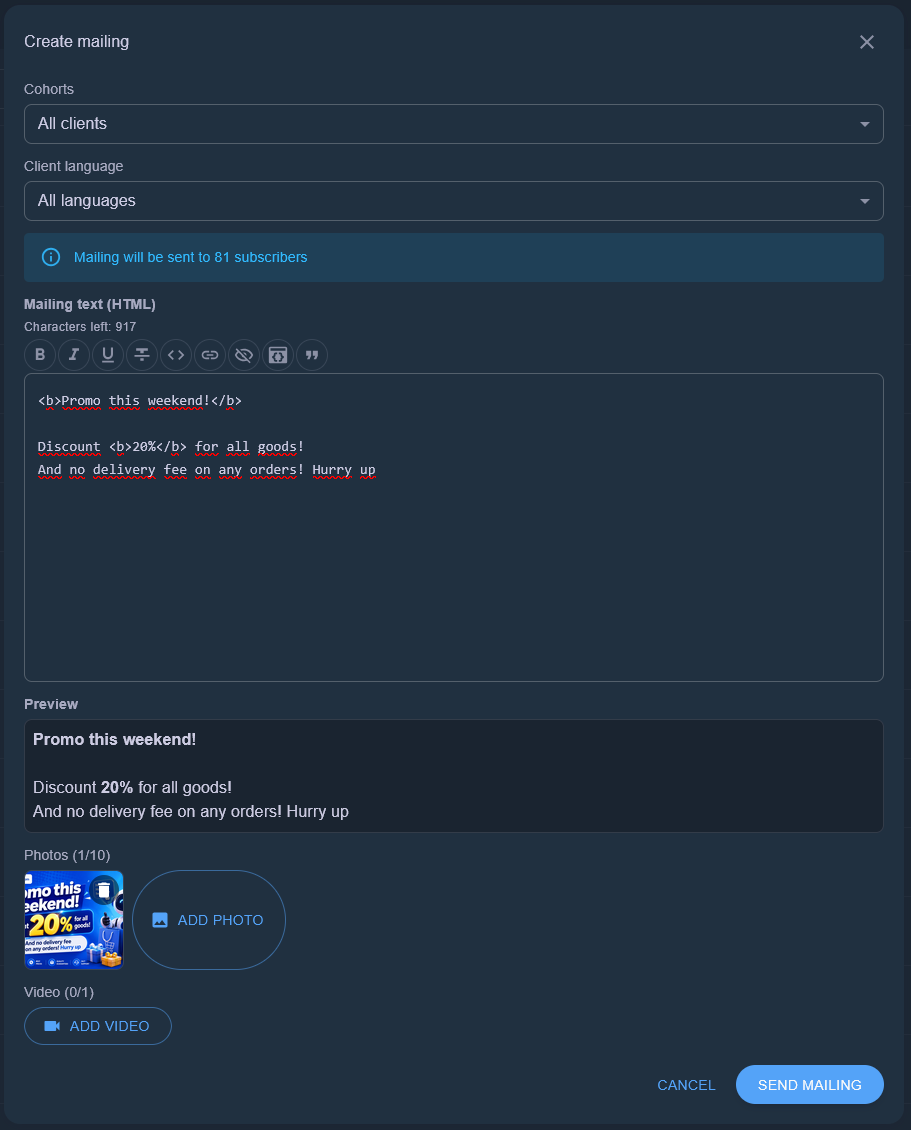
Write the message text. The buttons above the field insert HTML formatting: bold, italic, underline, strikethrough, code, link, spoiler, code block, and quote. A preview below the input shows the message exactly as the client will see it.
Telegram text length limits: up to 4096 characters without media, and up to 1024 characters when photos or a video are attached. The remaining character counter is shown above the field.
Attach up to 10 media files: several photos and at most 1 video (the video counts towards the limit of 10). For photos we recommend a single image with a caption, since multiple photos are sent as an album.
Click Send mailing. Sent messages cannot be recalled. The number of mailings per month is limited by your pricing plan.
¶ Formatting
Want your message to stand out? Text formatting uses HTML. HTML tags supported by Telegram:
- Bold: <b>text</b> or <strong>text</strong>
- Italic: <i>text</i> or <em>text</em>
- Underlined: <u>text</u> or <ins>text</ins>
- Strikethrough: <s>text</s>, <strike>text</strike> or <del>text</del>
- Spoiler (hidden text): <tg-spoiler>text</tg-spoiler>
- Monospace (code): <code>text</code>
- Code block: <pre>code</pre>
- Quote: <blockquote>text</blockquote>
- Link: <a href="https://example.com">link text</a>
- Combinations: tags can be nested — <b><i>Bold italic</i></b>
If the text contains an unclosed or unsupported tag, the form shows an error and won't let you send the mailing.
Mailing examples:
<b>Sale!</b> 20% off all products
<i>Today only</i> - <b>special offer</b>
<a href="https://t.me/appexbots_bot">Go to the shop</a>